Improve Your Novel’s Setting With Structural Editing – Fictionary

Focus on the settings in your novel and write a better story. Structural editing using Ficionary will help you get this done faster.

I highlighted every sentence that described the setting. What I realized was the author only described things or places that were relevant to the plot.

Most writers know the setting creates the story world. But in the context of novel structure, it can do so much more for you.

Consider the following for each scene when working on setting:…

Source: Improve Your Novel’s Setting With Structural Editing – Fictionary

Structural Editing for Characters and Point of View – Fictionary

Top 3 Character Elements To Make The Most Of A Structural Edit. How to revise and edit a novel focussing on characters and structure.


Why Do People Read Fiction?

Structural Edit and CharactersOne reason people read fiction is to escape and experience the world through the thoughts and actions of the characters in the story.

We believe characters are your story. They act and react. They create emotion. They show motivation. Without any of this, you don’t have a story. That’s a tall order for your characters.

So how do you make sure you’re putting the most into your characters? You edit and rewrite until your characters are performing at their best. A little bit of organization will help you quickly complete these revisions…

Source: Structural Editing for Characters and Point of View – Fictionary

Learn How To Self-Edit #AuthorToolboxBlogHop Opening A Scene

Nano Blog and Social Media Hop2Thank you, Raimey Gallant for organizing the #AuthorToolboxBlogHop. Today is the fourth post of this new series!

This is a monthly blog hop on the theme of resources/learning for authors: posts related to the craft of writing, editing, querying, marketing, publishing, blogging tips for authors, reviews of author-related products, anything that an author would find helpful.

To continue hopping through other great blogs in the monthly #AuthorToolboxBlogHop or to join, just hop on over to Ramey Gallant!

I’ll focus my entire series on self-editing. Here is what I’ve covered so far in the series:

Today’s topic is OPENING A SCENE.

Treat every scene like you would treat the opening scene in your novel. You’ve got to hook the readers so they don’t put your book down. You want them to be so intrigued by your scene opening, that they HAVE to keep reading.

You can do this be evaluating the scene opening type,  the scene entry hook, and scene anchoring.

Scene Opening Type

Don’t Bore Your Reader With Repetitive Scene Opening Types. You have four choices for scene opening type:

  • Dialogue
  • Thought
  • Description
  • Action

Go through each scene of your novel and label the scenes with one of the above. Then check that you haven’t been repetitive. Do many scenes in a row starting with one type is tiresome.

Scene Entry Hook

Get The Reader’s Attention With A Great Scene Hook

When creating a scene entry hook, consider:

  • Starting in media res (opening in the middle of action)
  • Foreshadowing trouble
  • Using a strong line of dialogue
  • Raising a question
  • Not wasting words on extraneous description

After your first draft is complete, check each scene and list how you created a hook. As with the scene opening type, you want to vary the method you use. Variety will keep the reader engaged.

Scene Anchoring

Anchor Your Readers, And They Won’t Put Your Book Down

Anchor The Point Of View:

Check whether the reader will know who has the point of view within the first paragraph or at least within the first couple of paragraphs of each scene. If not, the reader might find this frustrating.

If you write your entire novel from one point of view, like many first-person novels, then you don’t need to worry about this.

Anchor The Setting:

You know where the character is because you wrote the scene, but does your reader? If the reader can’t figure out the setting within the first couple of paragraphs, you may lose them–the reader I mean and not the character.

There are exceptions to this. If your scene is about a character waking in a dark place and confused about where she is, then it’s okay for the reader to be confused about where she is, too. This will add to the tension. The reader does need to understand the lack of setting is done on purpose

Anchor The Timing:

 The timing of the scene can mean:

  • Time of day
  • Time passed since the previous scene
  • A particular date

Your readers will get disoriented if they can’t follow the timeline. Check each scene and make sure the timing is clear.

More Self-Editing Advice


BIG-PICTURE Editing
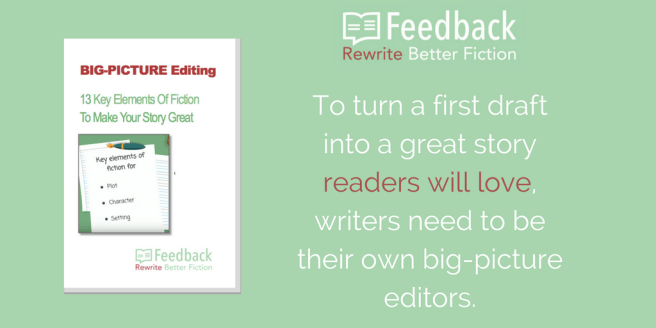
If you’re looking for more help on self-editing download the free eBook, BIG-PICTURE Editing 15 Key Elements of Fiction To Make Your Story Work and learn how big-picture editing is all about evaluating the major components of your story. We call these components the Key Elements Of Fiction.

Our eBook shows you how to use the key elements of fiction to evaluate your story and become your own big-picture editor.


Interested In An Automated Approach To Big-Picture Self-Editing?


Feedback Innovations (which I happen to be the CEO of) created Fictionary, on online tool for writers.

AVAILABLE FOR FREE TRIAL NOW!

Fictionary is the first web app to help fiction writers evaluate their own work with a focus on story, not words.

With Fictionary, you can focus on plot, character, and setting. You can evaluate on a scene-by-scene basis or on overall novel structure. Fictionary will show you the most important structural elements to work on first.

Fictionally will guide you through the rewriting process by asking you questions specific to your manuscript, enabling you to evaluate your own story.

Fictionally helps you visualize your manuscript. Forget about yellow stickies or white boards. Fictionary will draw character arcs, provide reports on scene evaluation, and show your rewriting progress.

Happy editing and thanks for reading…

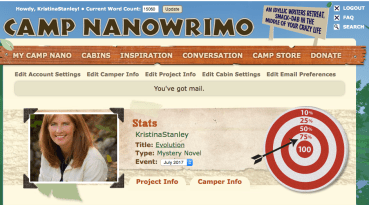
Camp NanoWriMo: 75% Done! Fictionary Launched!

It’s been a big week for me. I finished 75% of my Camp Nanowrimo word count goal, launched Fictionary, and created a Fictionary explainer video. Exhausting but truly fun.

Great DaneThe novel I’m writing in the camp is called Evolution and is a challenge for me. The Stone Mountain Series and Look The Other Way are all written in third person point of view. Evolution is written in first person point of view. It’s quite different to write an entire novel from on character’s point of view.

Daisy, a Great Dane, has a key part in Evolution. The story is written from Jaz Cooper’s point of view, but Daisy has a “big” role. I’m having lots of fun with her character. Can you see the slobber?

I’d love to know if any of you have written from both first and third person point of view and what challenges you faced. Any tips are most appreciated.

Fictionary - Logo - 400What does Fictionary have to do with Camp Nanowrimo?

I’m going to use Fictionary to do a big-picture edit on Evolution. I created the online tool for writers because I wanted a tool to help me edit the structure, not the words. Now I’m happy to share that with other writers who want to create a great story readers love. You can try Fictionary for free!

Screen Shot 2017-07-17 at 7.02.30 PMNow back to Nanwrimo.

I reached 75% of my word goal. That’s 15,000 words. 5,000 more and I have my first draft of Evolution done. Anyone else doing Camp Nanowrimo? Let me know in the comments how it’s going.


Screen Shot 2017-07-17 at 7.10.57 PM

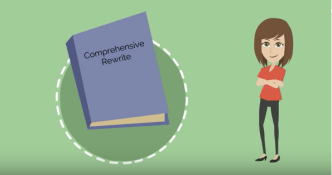
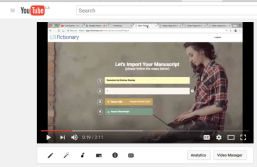
My first ever video is now on Youtube. It explains what Fictionary does. Creating this was a learning experience for me. I made the video on Youtube, then edited it using iMovie, then uploaded it back to Youtube.

There always seems to be a new challenge, but wouldn’t life be boring without it? 🙂

Thanks for reading.

Learn How To Self-Edit #AuthorToolboxBlogHop Emotional Impact of Setting

Nano Blog and Social Media Hop2Thank you, Raimey Gallant for organizing the #AuthorToolboxBlogHop. Today is the third post of this new series, and I’m very excited to be part of it.

This is a monthly blog hop on the theme of resources/learning for authors: posts related to the craft of writing, editing, querying, marketing, publishing, blogging tips for authors, reviews of author-related products, anything that an author would find helpful.

To continue hopping through other great blogs in the monthly #AuthorToolboxBlogHop or to join, just hop on over to Ramey Gallant!

I’ll focus this entire series on self-editing. The first blog in my series covers Why Learn To Self-EditThe second blog covered Characters In The Context of Editing.

Today’s topic is setting.

THE EMOTIONAL IMPACT OF SETTING

I once read a book where I didn’t skim any of the setting descriptions. Afterward, I wondered why. Engaging settings generate emotion.

I admit I’m impatient with too much description. To learn what captured me, I re-read the book and highlighted every sentence that described the setting. I realized the author only described things or places that were relevant to the plot.

That was the moment I went on a mission to learn everything I could about setting and how to use it to make my novels more enjoyable.

Location

Location is the place where a scene happens. 

When describing the location, ask yourself: Is the location important to the plot, characters, or theme? If no, fewer details are required. If yes, be more generous with the details.

Once you’ve determined the location for each scene, ask yourself if the setting is the best place for emotional impact. This one little question helps you:

  • Increase or decrease conflict
  • Increase or decrease tension
  • Set the mood
  • Highlight emotion
  • Show characterization
  • Slow down or speed up pacing

Thinking about location in terms of emotional impact will wake up your creativity. Let me give you an example.

Suppose you have a character who is afraid of the dark. Imagine the character is about to have a confrontation with an employee. If the character feels confident being in his office and you want the character to be in a position of strength, then use the office as a setting.

If you want him to feel vulnerable during the confrontation, try locating him outside, at night, in an isolated parking lot. And make it very dark. The streetlight is broken. There is no moon. Maybe it’s windy, so a yell for help won’t be heard.

Do you see the difference? The location can help you bring out emotion in the scene by showing conflict, tension, mood, and characterization. Conflict is action that is happening. Tension is the suspicion/dread something will happen.

You decide what emotion you want the reader to feel, then decide how the location can help elicit that emotion.

If you think the location is not the best place for emotional impact, it’s time for a rewrite. Set the scene where you can elicit strong emotions, then rewrite the scene in that location.


More Self-Editing Advice


BIG-PICTURE Editing
If you’re looking for more help on self-editing download the free eBook, BIG-PICTURE Editing 15 Key Elements of Fiction To Make Your Story Work and learn how big-picture editing is all about evaluating the major components of your story. We call these components the Key Elements Of Fiction.  Our eBook shows you how to use the key elements of fiction to evaluate your story and become your own big-picture editor.


Interested In An Automated Approach To Big-Picture Self-Editing?


Feedback Innovations (which I happen to be the CEO of) is building the Feedback app .

COMING AUGUST 2017! We are now testing with authors and you are invited to a free two-week trial. Just let me know if you’re interested.

Feedback is the first web app to help fiction writers evaluate their own work with a focus on story, not words.

With Feedback, you can focus on plot, character, and setting. You can evaluate on a scene-by-scene basis or on overall novel structure. Feedback will show you the most important structural elements to work on first.

Feedback will guide you through the rewriting process by asking you questions specific to your manuscript, enabling you to evaluate your own story.

Feedback helps you visualize your manuscript. Forget about yellow stickies or white boards. Feedback will draw character arcs, provide reports on scene evaluation, and show your rewriting progress.

Happy editing and thanks for reading…

BIG-PICTURE editing is about to get a whole lot easier! – Feedback For Fiction

Visualize Your Manuscript With The Feedback App – First Unveiling!

There was a lot of excitement at Feedback this week when our development team delivered our working prototype, and we took the app out to the writing community for early testing. We have authors from Canada, the US, and the UK using Feedback on their manuscripts, and the initial response has been fantastic.

Here is what author Donna Galanti had to say:

Hey, for those of you with a finished draft. This is a great editing application tool to use! It can help you make your story that much stronger structurally BEFORE you send it off to a developmental editor so you get the most value out of their service! They also have a handy guide on the 13 Key Elements of Fiction to Make Your Story Great. Check it out

Galanti, Donna 2
Donna Galanti is the author of the paranormal suspense Element Trilogy (Imajin Books) and the children’s fantasy adventure Joshua and The Lightning Road series (Month9Books). Donna is a contributing editor for International Thriller Writers the Big Thrill magazine. Visit her at http://www.elementtrilogy.com.


Visualizing My Manuscript

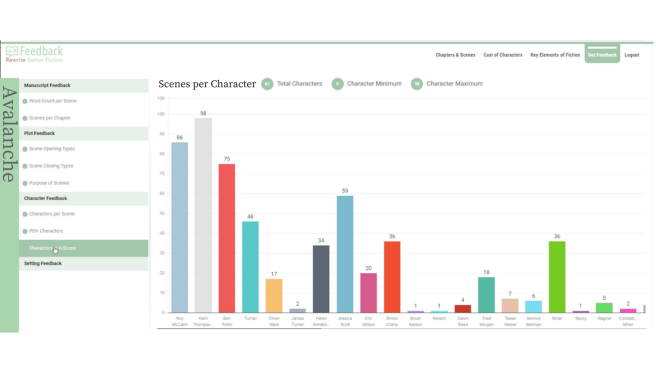
I imported AVALANCHE, my third novel, and seconds later, Feedback automatically showed me the number Scenes per Character.  You can quickly see that Kalin is present in the highest number of scenes. She’s the protagonist, so this makes sense. Next is Roy. The story is about Roy, so this is also good. Then comes Ben, Kalin’s love interest.

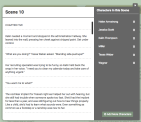
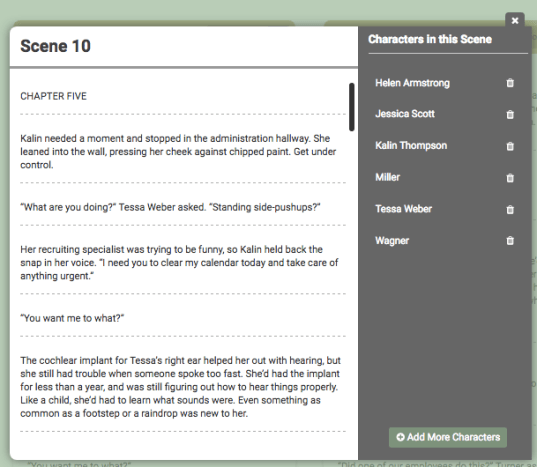
You can also look at a scene in detail.  If you want to know who is in a scene, the app shows you that too! So for scene 10 in Avalanche, you’ll see:


If you’re interested in early access to the app and testing some of the features, let me know!

All you have to do is sign up for early access, then send me an email. The writing community is amazing. The authors testing for us are generously spending their time and providing us with invaluable insights on how to make Feedback an app that will help writers turn their first draft into a great story readers love.

Coming Summer 2017

You heard that right. Summer 2017! We are targeting to make the Feedback app available to everyone later this summer. There is so much more to come, and I’ll keep sharing as more features are added.

Source: BIG-PICTURE editing is about to get a whole lot easier! – Feedback For Fiction

Big-Picture Editing and Word Count Per Scene – Feedback For Fiction

As a writer, you’ve probably read there are recommended lengths for a manuscript depending on the genre you write in. We’ve done some research and thought we’d share that with you.

In order of length, word count guidelines for a few of the popular genres are:

  • Novellas: 20,000 to 30,000
  • Middle Grade: 25,000 to 40,000
  • Romance: 40,000 to 100,000
  • Young Adult: 50,000 to 80,000
  • Mysteries, thrillers, and suspense: 70,000 to 100,000
  • Paranormal: 75,000 to 95,000
  • Fantasy: 90,000 to 100,000
  • Horror: 80,000 to 100,000
  • Science Fiction: 95,000 to 125,000
  • Historical: 100,000 to 120,000

Genre length may vary with different publishers, so check submission guidelines carefully. If you’re self-publishing, readers of the genres have come to expect a certain word count, and you don’t want to disappoint them, so think about the word count and make a conscious decision on the length of your novel.

But what about word count per scene?

When you’re about to begin a big-picture edit, you may wonder if counting the number of words per scene is important. We think it is, and we’ll tell you why.

Scene Emphasis

After you’re happy with the total word count for your novel, it’s time to evaluate how your word count is spread across your scenes.

By counting the words in each scene, you can see where you are putting emphasis and where you are not. Without knowing the specific word count, you don’t have a method to know if a critical scene is too short or a minor scene is too long.

Patterns

Some authors like to write scenes of the same length for the entire novel. Others vary the scene word count. The choice is yours, and you can use it to your advantage if you evaluate the per scene word count from a big-picture view.

If you follow a pattern (same word count per scene) throughout your novel and one scene is way longer than the rest of your scenes, make sure this is the climax scene. If it’s not, you probably have too many words in the scene.

How I Used Word Count To Improve My Novel

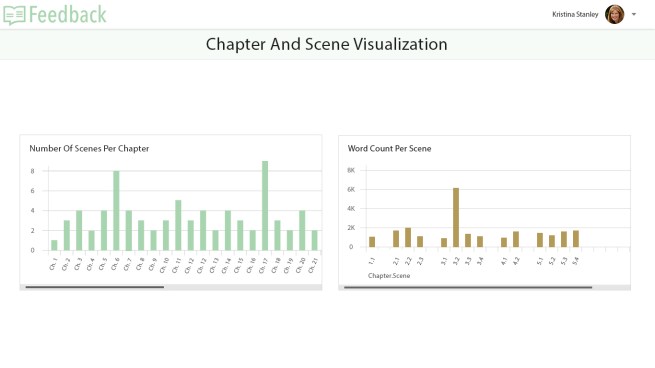
You can see in the Word Count Per Scene graph below, that scene 2 in chapter 3 is over 6000 words long. The other scenes in the novel are all under 2000 words. I discovered this during my big-picture edit of DESCENT (my first novel).

This was a scene early in the novel where my main protagonist, Kalin Thompson, moves to Stone Mountain Resort. In great detail, the scene described Kalin moving into her new apartment. After I looked at the word count, I realized I’d written the scene to give the reader a feel for resort life. Nothing much happened in the scene to move the plot forward.

I knew I needed to fix this. Instead of putting the details in one scene,  I cut the scene and sprinkled the details throughout the other scenes.

This improved the story by eliminating an info dump but still leaving in details that showed the reader what it’s like to move to a ski resort. If I hadn’t reviewed the word count of the scene in the context of the other scenes, I might have missed this.

How The Feedback App Will Help

Depending on the software you use to write your novel, counting the words in each scene can be a time-consuming exercise.

For example: In Microsoft word, you’ll highlight each scene and look at the word count displayed at the bottom of each page. In Scrivener, it’s a little easier. The word count is displayed at the bottom of each screen if you’ve broken your text into scenes as you write. In either case, you’ll have to keep track of the word count and evaluate it from a manuscript level.

The Feedback app will automatically break your novel into scenes and create a report showing you how many words are in each scene. You’ll be shown a graph, and can easily see where you need to focus on word count. Word count is one of the Key Elements Of Fiction the app uses to help you perform your own big-picture edit.

The Feedback App will also show you the breakdown of scenes per chapter. We’ll talk about this in another blog.
 

Download our free eBook, BIG-PICTURE Editing And The Key Elements Of Fiction and learn how big-picture editing is all about evaluating the major components of your story. We call these components the Key Elements Of Fiction.  Our eBook shows you how to use the key elements of fiction to evaluate your story and become your own big-picture editor.

Source: Big-Picture Editing and Word Count Per Scene – Feedback For Fiction
Free eBook: BIG-PICTURE Editing Using Feedback’s Key Elements Of Fiction

You’ve finished your first draft. Congratulations! Now what?

Whether you’re self-publishing or going the traditional route, your story needs to be as good as you can possibly make it before sharing with others.

Now is the time to evaluate your writing with a big-picture edit to ensure your story works and is compelling to your readers.

But just re-reading your novel and looking for areas of improvement without having a process can waste a lot of time. Questions that come to mind are:

  • Where to start?
  • What to change?
  • How to make it better?

DOWNLOAD Free eBook

Don’t despair. There is light at the end of the editing tunnel. Just like you learned how to write a novel, you can learn how to perform a big-picture edit. All you need is a clear process, some editing knowledge, and the right tool.

With our free eBookyou’ll learn how big-picture editing is all about evaluating the major components of your story. We call these components the Key Elements Of Fiction.  Our eBook shows you how to use the key elements of fiction to evaluate your story.

BIG-PICTURE Editing

Write Better Fiction: Do Scenes Per Chapter Matter?

Today on Write Better Fiction we’ll cover Scenes Per Chapter. Write Better Fiction is a process to help you critique your own manuscript and give yourself feedback. This will help you improve your novel, so you’re ready to submit it to an editor.

Last week we talked about the number of words in a scene. Today, I’m going to share how I look at the number of scenes in a chapter.

A scene or several scenes will make up a chapter. The Scenes Per Chapter report will illustrate the structure of your novel based on scenes in each chapter.

An author has two choices. Every chapter can have the same number of scenes, or the number of scenes per chapter varies throughout the novel.

A similar number of scenes per chapter: An author may choose to write chapters composed of exactly the same number of scenes or a similar number of scenes. They create a novel in this format, then they acquire readers, and the readers come to expect the structure throughout the novel. It might be risky for the author to change once they have established a following for their style.

Variable Number of Scenes Per Chapter: You must at least have one scene per chapter. It may only be one word or one sentence but it still counts as a scene. The upper limit is endless.

Potential pitfalls with the number of scenes per chapter:

One chapter with a greater number of scenes than the others: When the reader gets to this scene, he is going to wonder why so much time has been allocated to the scene. Either the author didn’t notice one scene was way too long, or he did on purpose because something very important is happening in the scene.

Switching Structure Mid-Novel: Even if the reader doesn’t register the number of scenes per chapter consciously, they may be jarred out of reading if the first half of the novel is written with the same number of scenes per chapter, and then the number changes. If you choose to have the same number of scenes per chapter, then remain consistent throughout the novel.

You won’t be surprised that I use my spreadsheet to count scenes per chapter and I look for anything that stands out as unusual. I ask myself why I wrote the chapter this way. Below is an example.

Screen Shot 2016-05-17 at 5.06.19 PM


In the above graph, you can see that chapter 3 is very different from the other chapters in the novel. In this case, I would consider breaking chapter 3 into two or more chapters.

The first and last chapters are very few scenes. The first chapter has only one scene. I did this because I want the reader engaged quickly and this helps keep the pace fast. I sometimes end a novel with only one scene in the final chapter. This is the chapter that comes after the climax, so I want to close things up but I don’t want the story to drag on.

As with word count per scene, this type of analysis is done when an author has finished the first draft. It’s a bird’s eye view of the structure and allows me to check the pacing and flow of my story.

I critiqued DESCENT, BLAZE and AVALANCHE using the techniques I’m sharing in Write Better Fiction, and I believe this helped me sign with a publisher.

Please let me know in the comments below if you examine your scenes per chapter and why you do this?

Thanks for reading…